

Jabra PanaCast 50 · Video Conferencing Bar
180° Panoramic 4K Video Bar for Medium Meeting Rooms
PanaCast 50 Intelligent All-in-One Video Bar Cameras, Mic Array and Speakers in One Unit
- 180° Panoramic 4K
- 3 × 13 MP Cameras
- 8-Mic Array, 4 Speakers
- Teams & Zoom Certified


Key Highlights
-
180° Panoramic View
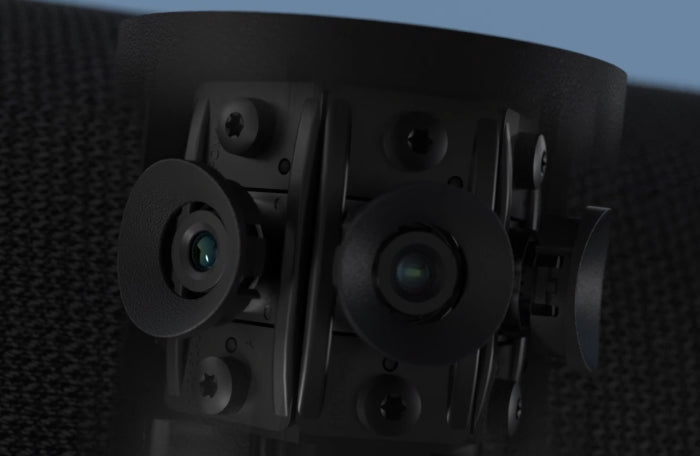
Three 13 MP cameras stitched into one panoramic image, 180° × 54°.
-
Panoramic 4K Video
3840 × 1080 at 30 fps with Vivid HDR and up to 6× lossless digital zoom.
-
Intelligent Framing
Intelligent Zoom, Virtual Director and Dynamic Composition adapt the view to who is speaking.
-
8-Mic Beamforming Array
Full-duplex audio with Automatic Speaker Detection.
-
4 Integrated Speakers
2 × 50 mm woofers and 2 × 20 mm tweeters, 80 Hz–20 kHz.
-
Built-in Content Camera
Dual-stream whiteboard sharing (needs separate Microsoft Teams Rooms certification).
-
Teams & Zoom Certified
Certified for Microsoft Teams, Teams Rooms, Zoom and Zoom Rooms.
Product information
Jabra PanaCast 50 is an intelligent video conferencing bar for professional meeting rooms. It puts a three-camera panoramic array, an eight-microphone beamforming array and four speakers into one front-of-room device, so a room can join Microsoft Teams or Zoom calls with one unit instead of separate cameras, microphones and speakers.
Key features
- Panoramic video: three 13 MP cameras are stitched into a 180° × 54° view at panoramic 4K (3840 × 1080, 30 fps), with up to 6× lossless digital zoom and Vivid HDR.
- Intelligent framing: Intelligent Zoom frames in-room participants, Virtual Director follows the active speaker, and Dynamic Composition switches between speaker views, close-ups and the full room.
- Intelligent Meeting Space: set virtual boundaries so people outside the meeting area, such as behind glass walls or in open-plan offices, can be kept out of the picture.
- Built-in content camera: supports dual-stream whiteboard sharing. On Microsoft Teams Rooms this function needs separate certification.
- Room audio: an 8-microphone beamforming array with full-duplex audio and Automatic Speaker Detection, plus four integrated speakers.
- Connections: USB-A, USB-C and Ethernet ports, with a 2 m USB cable in the box.
- Management: Jabra Direct, Jabra Sound+ and Jabra Xpress, the Jabra Plus platform, an SDK, and integrated PeopleCount for room usage insights.
- Platform support: certified by Jabra for Microsoft Teams, Microsoft Teams Rooms, Zoom and Zoom Rooms, and optimised for other leading UC platforms.
Ideal for
Corporate meeting rooms, hybrid meeting spaces, and Microsoft Teams Rooms and Zoom Rooms setups where everyone at the table should be visible. Jabra publishes room guidance of up to 4.5 m × 6 m (a Microsoft medium meeting room), and cites 4.5 m × 4.5 m for Teams certification. Treat these as guidance, not a guarantee, and contact us to check your room.
Why choose the Jabra PanaCast 50
A wide panoramic view lets remote participants see the whole room instead of a narrow crop, while automatic framing helps keep the active speaker in view without a camera operator. Camera, microphones and speakers arrive as one unit, which keeps installation simpler than a multi-device setup, and Jabra's management tools help IT teams look after rooms centrally.
Buy Jabra PanaCast 50 in India from Universal AV Solutions with supply, installation and after-sales support across Delhi NCR and pan-India. Contact us for the latest price and a GST quotation. You can also compare other video conferencing bars and video conferencing systems, or read about our corporate AV solutions and video conferencing solutions for meeting rooms.
Specifications are based on the manufacturer's published information and may change. Contact Universal AV Solutions to confirm what is included with your order. All brand names are trademarks of their respective owners.
Applications
-
Corporate Meeting Rooms
Medium-sized rooms where remote participants should see everyone at the table.
-
Microsoft Teams Rooms
Rooms running Teams Rooms, with the PanaCast 50 listed by Jabra as certified for Microsoft Teams and Teams Rooms.
-
Zoom Rooms
Rooms running Zoom Rooms, with the PanaCast 50 listed by Jabra as certified for Zoom and Zoom Rooms.
-
Hybrid Collaboration Spaces
Mixed in-room and remote meetings that benefit from a panoramic view and automatic speaker framing.
-
Conference Rooms and Boardrooms
Rooms within Jabra's published size guidance; check larger boardrooms with our team first.
-
Glass-Walled and Open-Plan Rooms
Intelligent Meeting Space lets you set virtual boundaries for the meeting area.
Technical Specifications
Video
- Cameras
- 3 × >4K (13 MP) cameras in a multi-camera array with real-time AI video stitching
- Field of View
- 180° horizontal × 54° vertical (can be reduced in Jabra Direct and Jabra Xpress)
- Panoramic Resolution
- Panoramic-4K, 3840 × 1080 at 30 fps
- Digital Zoom
- Up to 6× lossless digital zoom
- Video Features
- Intelligent Zoom, Virtual Director, Dynamic Composition, Vivid HDR, manual PTZ
- Intelligent Meeting Space
- Virtual boundaries for the meeting area, useful for glass-walled and open-plan rooms
- Content Camera
- Integrated content camera with dual-stream whiteboard sharing (this function needs separate Microsoft Teams Rooms certification)
- PeopleCount
- Integrated PeopleCount for safety capacity and room usage insights
Audio
- Microphones
- 8-microphone beamforming array, -37 dBFS sensitivity, 100 Hz–8 kHz frequency range
- Speakers
- 4 speakers: 2 × 50 mm woofers and 2 × 20 mm tweeters in a zero-vibration stereo setup, 80 Hz–20 kHz
- Audio Features
- Full duplex, Automatic Speaker Detection, precision voice detection (echo and static noise removal)
- Assistive Listening
- Aux-Out for assistive listening devices through a hearing augmentation transmitter
Connectivity
- Ports
- USB-A, USB-C, Ethernet (RJ45)
- USB
- USB 2.0 / USB 3.0 supported; 2 m USB-C to USB-A cable (USB 3.0) included
- Bluetooth
- Bluetooth Low Energy for remote control and Jabra Sound+ access
- Computer Support
- PC and Mac: Windows 10; macOS 10.15 and later (including macOS 11.x)
Software & Management
- Compatible Software
- Jabra Direct, Jabra Sound+, Jabra Xpress
- Device Management
- Jabra Plus platform to view, manage, control and update devices
- SDK
- Available
Compatibility & Room Size
- Certified Platforms
- Microsoft Teams, Microsoft Teams Rooms, Zoom and Zoom Rooms; optimised for other leading UC platforms (per Jabra)
- Intelligent Speaker
- Works with Microsoft Teams Rooms Intelligent Speaker functionality (live transcription and recap need a separate Microsoft Copilot licence)
- Room Size Guidance
- Jabra lists rooms up to 4.5 m × 6 m (Microsoft medium meeting room) and, for Teams certification, 4.5 m × 4.5 m. This is guidance, not a guarantee; contact us to confirm your room.
Physical & Package
- Dimensions (W × H × D)
- 650 × 80 × 125 mm
- Weight
- 2,200 g
- Operating Temperature
- 5°C to 35°C
- Storage Temperature
- -20°C to 60°C
- Packaging Dimensions (W × H × D)
- 685 × 167 × 130 mm
- In the Box
- PanaCast 50 camera, power supply, wall mount, USB-C to USB-A cable (2 m, USB 3.0)
- Mounting
- Wall mount included; table stand and screen mount are optional accessories
- Warranty
- 2 years (as published by Jabra)
- Portability
- Not designed for portable use, per Jabra
Frequently Asked Questions
What is the Jabra PanaCast 50?
The Jabra PanaCast 50 is an intelligent all-in-one video bar for meeting rooms. It combines a three-camera panoramic array (3 × 13 MP), an 8-microphone beamforming array and four speakers in one device.
What room size is the Jabra PanaCast 50 designed for?
Jabra lists rooms of up to 4.5 m × 6 m, which Microsoft categorises as a medium meeting room, and cites 4.5 m × 4.5 m for Microsoft Teams certification. This is guidance, not a guarantee, so contact Universal AV Solutions to check your room.
Does the Jabra PanaCast 50 support Microsoft Teams?
Yes. Jabra lists the PanaCast 50 as certified for Microsoft Teams and Microsoft Teams Rooms. The dual-stream whiteboard function on Teams Rooms needs separate certification.
Does the Jabra PanaCast 50 support Zoom?
Yes. Jabra lists it as certified for Zoom and Zoom Rooms, and as optimised for other leading UC platforms.
Does the Jabra PanaCast 50 support 4K and 180° panoramic video?
Yes. Three 13 MP cameras are stitched into a 180° horizontal × 54° vertical view at Panoramic-4K, which is 3840 × 1080 at 30 fps. That is a wide panoramic format rather than a standard 3840 × 2160 frame. The field of view can be reduced in Jabra Direct and Jabra Xpress.
Does the Jabra PanaCast 50 support whiteboard streaming?
Yes. Its integrated content camera supports dual-stream whiteboard sharing, streaming whiteboard content and in-room participants at the same time. On Microsoft Teams Rooms this function needs separate certification.
What ports and accessories come with the Jabra PanaCast 50?
It has USB-A, USB-C and Ethernet (RJ45) ports. The box contains the camera, a power supply, a wall mount and a 2 m USB-C to USB-A (USB 3.0) cable. A table stand and a screen mount are optional accessories.